
When writing Python programs, errors are unavoidable. Whether it’s user input, file handling, or network issues—your program can crash unexpectedly.
That’s where Python exception handling becomes essential.
Exception handling allows your program to:
- Continue running after errors
- Handle unexpected situations gracefully
- Improve user experience
- Make debugging easier
What is an Exception in Python?
An exception is an error that occurs during the execution of a program.
Example:
x = 10 / 0
❌ Output:
ZeroDivisionError: division by zero
Here, Python stops execution because it cannot divide by zero.
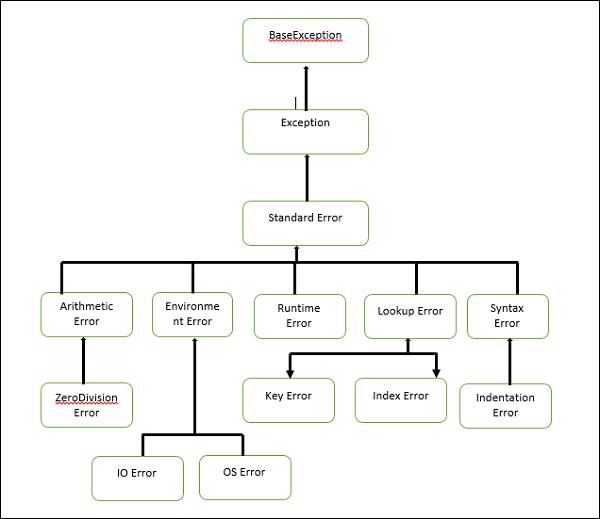
Types of Exceptions in Python
6
Some common built-in exceptions include:
- ZeroDivisionError → Division by zero
- ValueError → Invalid value
- TypeError → Wrong data type
- IndexError → List index out of range
- KeyError → Dictionary key not found
- FileNotFoundError → File does not exist
Try and Except Blocks
The try and except blocks are used to catch and handle exceptions.
Syntax:
try:
# risky code
except:
# runs if error occurs
Example:
try:
num = int(input(“Enter a number: “))
print(10 / num)
except:
print(“Invalid input or division by zero!”)
👉 Instead of crashing, the program handles the error.
Handling Specific Exceptions
It’s better to handle specific exceptions rather than using a general except.
try:
num = int(input(“Enter a number: “))
print(10 / num)
except ZeroDivisionError:
print(“You cannot divide by zero!”)
except ValueError:
print(“Invalid number entered!”)
Handling Multiple Exceptions
You can handle multiple exceptions in one block:
try:
a = int(input())
b = int(input())
print(a / b)
except (ValueError, ZeroDivisionError):
print(“Invalid input or division by zero”)
Else Clause in Try Block
The else block executes only if no exception occurs.
try:
num = int(input(“Enter number: “))
except ValueError:
print(“Invalid input”)
else:
print(“You entered:”, num)
👉 Useful for separating error-handling and normal logic.
Finally Block Explained
The finally block always executes, whether an exception occurs or not.
try:
file = open(“data.txt”, “r”)
except FileNotFoundError:
print(“File not found”)
finally:
print(“Execution completed”)
Common uses:
- Closing files
- Releasing resources
- Database cleanup
Raising Exceptions in Python
You can manually raise exceptions using raise.
age = int(input(“Enter age: “))
if age < 18:
raise ValueError(“You must be 18+”)
Custom Exceptions in Python
You can create your own exception classes.
class CustomError(Exception):
pass
try:
raise CustomError(“This is a custom error”)
except CustomError as e:
print(e)
Best Practices for Exception Handling
✔ Catch specific exceptions
✔ Avoid bare except
✔ Use finally for cleanup
✔ Log errors properly
✔ Don’t suppress errors silently
✔ Keep try blocks small
Real-World Example
Example: File Handling
try:
with open(“data.txt”) as f:
data = f.read()
except FileNotFoundError:
print(“File not found”)
finally:
print(“Done”)
Example: API Call
import requests
try:
r = requests.get(“https://api.example.com”)
print(r.json())
except requests.exceptions.RequestException:
print(“API error”)
Common Mistakes to Avoid
Using except: without specifying error
Ignoring exceptions
Writing too much code inside try
Not using finally when needed
Conclusion
Python exception handling is a powerful tool that makes your programs:
- More robust
- Easier to debug
- User-friendly
By mastering try, except, and finally, you ensure your code can handle unexpected situations smoothly.
FAQs (HIGH SEO VALUE)
🔹 What is try-except in Python?
Used to handle errors and prevent program crash.
🔹 What is finally block in Python?
Always executes, even if error occurs.
🔹 Can we use try without except?
Yes, with finally.